
Macintosh Mini - Maclock conversion project

This new interposer board plugs in between the Pi and Waveshare

OK, this is really making the whole project accessible to anyone. That’s pretty cool. I have had several people I work with suggest stuff like “wow, you should make these“ or “You should sell these” or “I wanna make one. . . was it hard to do that?” to which I have to admit that you can’t just buy one, that there is plenty of tiny soldering work, and suddenly, tasks that I find fun and interesting myself start to come out and I realize this isn’t really a project normal people can take on!

Your boards are definitely making it easier!

My Pi didn’t have headers, so when I added them, I simply skipped the relevant pins. Then, once attached to the display I went in and soldered my wires in the locations needed. No bending, but certainly fiddly, especially as I needed to reconcile GPIO pinouts with diagrams turned upside-down and backwards. Talk about double, triple, quadruple checking. . . that was my biggest challenge when the only way to know if I did it right was the final test. This eliminates the guesswork. Nice!
 
  • Like
Reactions: wells
The previous design is still available on my GitHub, but I ordered the first batch of production samples today. I ordered a bunch, so if anyone is interested in buying one or two (assuming they work), I'd be open to that.

I continue to get comments on the Maclock/MacintoshMini, so although I have a working build, I'm probably not the only one wondering. . . did your updated prototype board work?

I was also thinking about the capacitive switch under the top surface. I unplugged mine and just taped it up out of the way, but a switch is a switch! Has anyone thought of a good use for it? Maybe to instantly black the screen like sleep mode? I know, the rotary does the dimming.

What would be cool is capacitive mouse steering and tap to click. Like the surface of an appleTV remote. Now THAT would be handy.
 
  • Like
Reactions: JDW
OH! I just had an idea for the Capacitive "switch" on top. . .

What about using it as a mouse click and setup an accelerometer-based mouse input akin to this:

The idea is that you pickup the MacintoshMini and "steer" the cursor by tilting, then click with a tap on top.

I know, just connect your mouse, but this could be pretty cool if it could be constructed out of a tiny microcontroller with accelerometer/gyro. Load up firmware so it behaves like a USB mouse and plug it in, close up the mini. Use your external USB port for a keyboard if you ever need one.
 
  • Like
Reactions: JDW
did your updated prototype board work?


tl;dw: maybe! it turns out I ordered the wrong connectors. I used JST SH plugs on the board, but the Maclock uses Molex PicoBlade (or clones) which are bigger... so now I need to splice some JST 1.0 to PB 1.25 mm pigtails to plug them in properly.

Also, maybe getting a bit ahead of myself, but I finally feel ready to share:

I put together a little shop and I'm going to start selling kits for the Maclock → Macintosh Mini conversion (and a few other projects I've got in the works 🙂). Yall are the first people I'm sharing it with, and it's not finished yet, but you can check it out here: https://shop.wells.ee/products/macintosh-mini/
 
@wells
And just when we all thought it couldn't get any better, you go and offer fantastic DIY kits at really great prices! Very nice! 🕺

I assume that neither kit includes the battery because Maclock already has one inside that can be used with the kit, correct?
 
@wells I know sound isn't the main reason most of us probably would build one of these, but I am curious if the audio distortion improves at all with your embedded audio chip. I ended up pulling the battery power on mine which helped (using the adafruit module) but it still makes faint clicks and noises during activity if you listen carefully. I know others have opted to use USB audio which eliminates the problem. I also read somewhere about a filter circuit someone made to improve a similar issue on an unrelated Pi project.

Of course, I am as happy as can be with this just as it is and it's putting a lot of smiles on faces around me, but it keeps getting better. Nice!
 
  • Like
Reactions: JDW
@JDW no battery included since the Maclock already ships with its own 18650. But since it plugs into the charge controller with a molex microblade connector, you could conceivably replace it with a much larger capacity battery if you wanted to!


@caver01 I finally had a chance to integration-test the new rev.2026.10 board and sadly the distortion still exists 🙁 it's made a bit better by dropping the system audio volume -4dB, but there's a persistent hiss/crackle when the system is running.
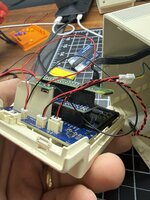
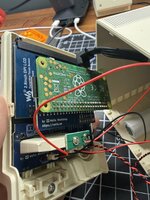
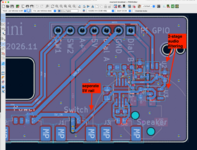
After doing some extensive debugging, the problem is (unsurprisingly) mostly noise coming from two places:
  1. the audio circuit shares a 5V trace with the Pi and Waveshare display, so any noise on that line gets picked up by the amplifier chip
  2. the GPIO audio line itself carries a ton of noise that needs filtering, that my circuit doesn't currently have.
the good news: the interposer works well! and a future redesign of the interposer could even make it possible to mount a Pi 3A+ in addition to the Zero 2 W with no clearance issues.

I've decided (disappointingly) I should probably redo the 2026.10 boards -- between the audio issues, the wrong encoder, and the wrong-connector-size issue, I'm going to chalk it up as a learning experience and move on to a 2026.11 revision that fixes the power + floppy switch connector and adds the audio filtering that should hopefully resolve the issues. I was also able to find the exact part # for the Maclock's original encoder (for brightness), meaning the plastic dial should fit perfectly without slipping.


If anyone reading this is more adept at circuit design than me (especially GPIO audio!!) and wants to take a look, I'd greatly appreciate any help! https://github.com/wr/macintosh-mini/pull/21
 

Attachments

  • IMG_2130.jpeg
    IMG_2130.jpeg
    1.3 MB · Views: 34
  • IMG_2131.jpeg
    IMG_2131.jpeg
    1.3 MB · Views: 39
  • Screenshot 2026-10-05 at 10.22.48 AM.png
    Screenshot 2026-10-05 at 10.22.48 AM.png
    236.7 KB · Views: 39
Last edited:
  • Like
Reactions: caver01 and JDW
PCB production is hard!

I ordered a new batch of the revised boards from PCBway on the 13th. I'm really excited to see how well the new audio circuit works. Meanwhile, I'm happy to say that orders have started trickling in from my new shop, and I'm including little adapter pigtails so that the earlier batch of boards don't go to waste. Crimping all of those JST connectors is a huge time sink, but I just turned on some music and made an evening of it.

Last week, I received an order for a fully-assembled Mini! Which was neat, because I haven't done a full soup-to-nuts build in a while.

While building it, I immediately noticed a problem. I had the power lead pinout backwards. So not only did this mean my new batch of boards was now totally messed up... the pigtails I put together were also backwards! UGH. What a nightmare.

Wrong
1793296981716.png


Right
1793296964435.png


So redesign is again submitted to PCBway for manufacture, and a bunch of emails out to my very patient customers explaining how to swap the pins on the JST connector pigtails. More delays... but it will hopefully be worth it?
 
  • Sad
Reactions: JDW
I forgot to mention the moral of the story!

The audio buzz/crackle has really been getting to me. If you have sensitive ears, it's beyond annoying. While waiting for approval from PCBway, I tried experimenting with selectively muting the audio output from the Pi when the emulator isn't using it. I originally dismissed the idea because I thought there'd be too much delay.

However I found that I could do it with virtually no lag at all... the new script detects audio from the emulator in realtime, with only about 0.1s or less of delay between sound starting and audio re-enabling. From there, it keeps the audio pin active until there's 3s or more of silence.

This turns out to help A LOT because now the speaker is silent 99% of the time. I also reduced the default volume slightly, since 100% volume was causing a bunch of clipping.

If you've been having audio issues, I definitely recommend trying out the new script: https://github.com/wr/macintosh-mini/releases/tag/v1.10.0
 
  • Love
  • Like
Reactions: JDW and caver01
Excellent! I grabbed a new version last weekend and looking forward to trying the audio fix. Great idea.

JST crimping is no joke. My crimper is cheap so that probably doesn’t help, but it’s definitely a contact lenses removed close up affair that I dread every time.
 
  • Like
Reactions: JDW
Back