Compact Mac Video Adapter

Wow well your board looks awesome and I think there is room for many solutions!


I am exploring a combo of the ATX4VC and RGB2HDMI to create a mac SE that doesn't have a monitor or analog board, but that is a pretty expensive proposition as far as hardware and a lot of pieces.
 
Here's a video by someone very recently showing this working -

I started working on a board based on the waveguide.se design mid last year to use with an OSSC, but that was before he updated to mention the different config required for a Mac Plus/512/128k, and I think on reflection and after watching the video I've linked, that this RP2040 based one is a better idea. Sigh :) My board went to a back burner after I designed and had a few fabbed, and also a kid.. just getting back to it now and I see things have moved on..
View attachment 11675
glorious
 
  • Like
Reactions: Paolo B
@landogriffin poked around doing a color video-out on the SE/30 using the PiSCSI emulating the PowerView. However, it seems video refresh maybe not be as quick when using RaSCSI that JCS observed: "Some high-resolution logging shows it [takes] about 83 milliseconds to receive the 21888 bytes of data through SCSI, and about [three] milliseconds to convert it and draw it on the frame buffer."

So, I wonder about using a GPU from Texas Instruments, the TMS34010, with some VRAM. I am unsure if the TMS34010 is available anymore, so I need to figure out something equivalent.
 
Last edited:
Hi. I’m a total technical imbecile. I can only follow very logical instructions 😛

I have an SE/30 board I’d like to put back to life. I got a pico atx to power it up.

Now I’m looking for a solution for the video output.

My question: is any of the solutions mentioned in this thread available as a product or PCB I can get printed and populated?

Thanx
 
  • Like
Reactions: JDW
Hi. I’m a total technical imbecile. I can only follow very logical instructions 😛

I have an SE/30 board I’d like to put back to life. I got a pico atx to power it up.

Now I’m looking for a solution for the video output.

My question: is any of the solutions mentioned in this thread available as a product or PCB I can get printed and populated?

Thanx
Are you trying to fix/replace the internal display, or just looking to add an external monitor to your SE/30?
 
Are you trying to fix/replace the internal display, or just looking to add an external monitor to your SE/30?

Getting compact Macs in my side of the world is very difficult! You simply can't get them. When they do surface, ppl ask an arm and a leg for it!

I only have the case and the motherboard! I want to hook it to a power source and use an LCD. For HD I'll go with a BlueSCSI.
 
  • Like
Reactions: JDW
Thanks for the answer. You have shown the solution for a Macintosh Classic. I think my Mac Video Adapter FSI 1988 was installed in a Macintosh SE. I found a blurry photo on the net. There is a clip at the end of the white wire, this is probably connected directly to a chip.
But to which one and to which pin?

View attachment 2222

LG Rappi

I also acquired a Mac SE with one of these inside. The clip was attached to the GLU chip, pin 19
 
I also acquired a Mac SE with one of these inside. The clip was attached to the GLU chip, pin 19
On the adapter board, the white wire is labeled “dot clock”
Pin 19 of the GLU is, unsurprisingly, a clock line, but I don’t know precisely what it should be called. It’s the same signal used as FCLK by the IWM. Is there no complete schematic of the SE out there? I know SE Reloaded exists, but that’s only gerbers.
 
Guess I should add some photos so it's clear what hardware I'm talking about.

First, a WARNING! label on top, which identifies it as the "SAYETT DATASHOW HR/M Video adapter":
IMG_5395.jpeg


The connector on the back:
IMG_5396.jpeg

Turns out that warning isn't even applicable since they actually used the SE's expansion bracket thing rather than mounting the connector directly to the rear case.

First peek inside:
IMG_5658D.jpeg


Before removing the clip:
IMG_5659D.jpeg


Close-up of clip:
IMG_5660D.jpeg


Adapter top view: text under the left connector reads "MAC Video Adapter FSI 1988 Made In the USA"
IMG_5691.jpeg


Adapter bottom view: text reads "Eastman Kodak P/N 8010 REV E"
IMG_5693D.jpeg


Both sides are covered with adhesive goo from the black insulating pads that were stuck on.

Trying to show the wire colors/positions on the connector:
IMG_5694D.jpeg
IMG_5695D.jpeg
 
Last edited:
  • Like
Reactions: lilliputian
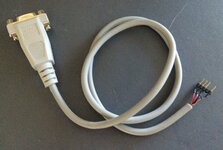
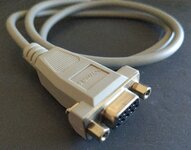
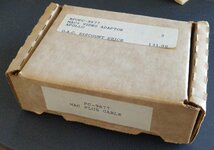
I just got one of the Power R adapters for my Mac Plus, but it came with its original instructions, which state that it's from "Apollo Audio Visual", and that it's a "PC-9677", despite having the 2702 moniker on the device itself, and even Power R on the cable! I've yet to try it (I don't know what the intended output is, and the instructions are not very helpful), but here are some photos for everybody!

There's also a "2703" that I know of, which is I believe is for the SE.
 

Attachments

  • IMG_20250725_171405~2.jpg
    IMG_20250725_171405~2.jpg
    1.1 MB · Views: 220
  • IMG_20250725_171418~2.jpg
    IMG_20250725_171418~2.jpg
    1.7 MB · Views: 199
  • IMG_20250725_171432~2.jpg
    IMG_20250725_171432~2.jpg
    1.9 MB · Views: 221
  • IMG_20250725_171451~2.jpg
    IMG_20250725_171451~2.jpg
    1.7 MB · Views: 228
  • IMG_20250725_171521~2.jpg
    IMG_20250725_171521~2.jpg
    1.6 MB · Views: 208
  • IMG_20250725_171557~2.jpg
    IMG_20250725_171557~2.jpg
    756.6 KB · Views: 220
  • Love
Reactions: JDW
So in comparing the pinout of the 2702 (courtesy of @Stephen at the top of this thread!) and that of CGA, it looks like what happens is that the video line from the adapter is just tied to R, G, and B, meaning they'll be recombined by the monitor to form the full picture. I'm not really looking to use an old CGA monitor for this, and while there do appear to be RGBtoHDMI adapters out there, they're quite expensive (more than I paid for the 2702 anyway!).

That being said, I have already a VGA to HDMI adapter, and in principal CGA is forwards compatible with VGA with an adapter, so I should be able to get away with a 9-pin CGA-to-15-pin VGA adapter and everything should be good to go, yes?
 
  • Like
Reactions: JDW
Back