BlueSCSI Wi-FI DaynaPort issue

Brutus75

New Tinkerer
Aug 15, 2025
26
1
5
3
Hi There,

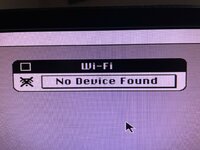
I have a Desktop BlueSCSI V2 - 2023.10a with a Pico W. It is working with my Quadra 650 and I can now browse the internet using the BlueSCSI Wi-Fi, but I have a funny issue. When I open the Apple menu item "Wi-Fi" it opens but then says "No Device found". I have the Daynaport driver installed (I did a custom install and choose the SCSI/Link driver). I have tried it in System 7.1 and 7.5.3 with the same result. I have included a screenshot of the error.
 

Attachments

  • wifi error.jpg
    wifi error.jpg
    656.3 KB · Views: 201
Do you have the HDA and INI file for the network adapter on your SD card? In a tool like SCSI Probe, you should see "Processor" or "Dayna Processor" as one of your SCSI IDs.
 
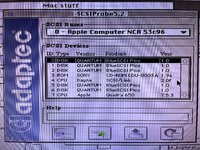
Yes I have both files and it does show up under SCSIProbe. I can browse the internet fine I just get that error in the Wi-Fi app. I have attached a pic. It is SCSI ID 4.
 

Attachments

  • thumbnail_IMG_5858.jpg
    thumbnail_IMG_5858.jpg
    745.4 KB · Views: 325
Yes I have both files and it does show up under SCSIProbe. I can browse the internet fine I just get that error in the Wi-Fi app. I have attached a pic. It is SCSI ID 4.
I figured it out. I unplugged the physical CD-ROM in the Quadra 650 and then it fixed the issue.
 
I faced a similar problem, I didn't study it thoroughly, but it wasn't like that at first glance

Connected to BSv2

0 Disk
1 Disc
2 Disk
3 CD
4 Disk
5 Disk
6 Wi-Fi

SCSI on another channel is connected

3 CD
5 ZIP

The Wi-Fi app can't find the device.
I remove several disks in BlueSCSI, and Wi-Fi app working normally.

Now I don't fill it out completely and I don't face it anymore.
 
Hello, I have problems with Dayna :(

0) Bought BlueSCSI for powerbook, version with WiFi
1) Driver DaynaPORT SCSI/Link installed
2) NE4.hda is exist and mount, no HD40 or CD40 exist in folders
3) in log I see:
Clock set to: 200MHz
Initialization complete!
Disabling status LED
Successfully connected to Wi-Fi SSID "MyWiFi"
INFO: Pico Voltage: 3.365V.


3) SCSIProbe 4.3 shown:
| 4 | CPU | BlueSCSI | Virtual HD | 2.0 |

My ini file in attach

Where I was miss? Any help would be appreciated
 

Attachments

Successfully connected to Wi-Fi SSID "MyWiFi" -- Reports that BlueSCSI has connected to the "MyWiFi" network, you can see it on the router.

Now you need to install the driver in System Software / Mac OS 7, and select Alternative Ethernet in the network settings.
 
Successfully connected to Wi-Fi SSID "MyWiFi" -- Reports that BlueSCSI has connected to the "MyWiFi" network, you can see it on the router.

Now you need to install the driver in System Software / Mac OS 7, and select Alternative Ethernet in the network settings.
I assume, the driver already installed, but nor MacTCP nor OpenConnect doesn't see network at all :(
But when install driver quick variant show me that no device found, but when select custom mode, I can install it.
 
Hello, I have problems with Dayna :(

0) Bought BlueSCSI for powerbook, version with WiFi
1) Driver DaynaPORT SCSI/Link installed
2) NE4.hda is exist and mount, no HD40 or CD40 exist in folders
3) in log I see:
Clock set to: 200MHz
Initialization complete!
Disabling status LED
Successfully connected to Wi-Fi SSID "MyWiFi"
INFO: Pico Voltage: 3.365V.


3) SCSIProbe 4.3 shown:
| 4 | CPU | BlueSCSI | Virtual HD | 2.0 |

My ini file in attach

Where I was miss? Any help would be appreciated
I‘d try with everything removed from the bluescsi.ini except the wifi configuration. It looks like your „virtual hd“ configuration overwrites the DaynaPort name and therefore is not recognized by the driver
 
  • Like
Reactions: eric and iQQator
I assume, the driver already installed, but nor MacTCP nor OpenConnect doesn't see network at all :(
But when install driver quick variant show me that no device found, but when select custom mode, I can install it.
This is not a valid ini file - and yes do as @robin-fo suggests. You do not need any of that extra stuff in the ini file, it is likely the cause of your issues. BlueSCSI is meant to be simple and you never need to touch the ini file, 99% of the time you dont even need to create one.
 
Yeah, I fixed now, move hdd to [SCSI1] and [SCSI5] parts, some cleanup and voila, all work like a charm ;)
Thx for help.
 
Back