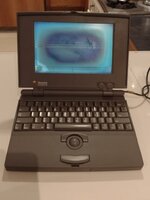
LCD Screen replacement for Powerbook 100

yomatiase

New Tinkerer
Apr 18, 2022
32
19
8
I have a pristine powerbook 100 but the screen is dead.
I found two sites that offer the part
Do you have any references of this sites?


Thank you all!!!
 

Attachments

  • WhatsApp Image 2022-04-17 at 10.26.16 PM.jpeg
    WhatsApp Image 2022-04-17 at 10.26.16 PM.jpeg
    52.3 KB · Views: 393
you have to be lucky to find a good powerbook 100 screen. Most panels have pink spots. I have several bad one’s with this issue.
The cheaper option is probably looking for a faulty pb100 that still has a good screen.

It’s like with the tunel vision issues on the active matrix screens of the 100, duo and 500 series. The powerbook 100 LCD’s get pink spots, which can be very large.
 
Pink spots are generally caused by being stored in a stack. The trackball presses against the LCD and pixels start to die. PowerBooks should be stored on their edge, with no compressive force, to avoid the trackball killing LCD pixels.

edit: alternately, remove the trackball before storage. Just don't lose them. :)
 
That display should be fixable as well. It’s got vinegar syndrome, which is an issue with the display polarizer adhesive going bad. If you replace the polarizing film the display should work again.

The PowerBook‘s logic board and the display will also need to be recapped as well if you haven’t done that already.
 
  • Like
Reactions: KingDingus
Pink spots are generally caused by being stored in a stack. The trackball presses against the LCD and pixels start to die. PowerBooks should be stored on their edge, with no compressive force, to avoid the trackball killing LCD pixels.
Store them bookended on an open air shelf on their sides and cracked opened a bit as well. Vinegar syndrome is contagious in enclosed spaces and unimpeded airflow across the LCD surface appears to be a preventative from what I've read. Fascinating, if really aggravating stuff that.
 
Back