

Power Macintosh 7200/7300/7500/7600 Power Button
- Thread starter Adam
- Start date
You are using an out of date browser. It may not display this or other websites correctly.
You should upgrade or use an alternative browser.
You should upgrade or use an alternative browser.

Did you attach the STL? I looked at your post but couldn't see it.If you make one let me know how it goes

I have a couple of machines that I bought with the power button missing altogether, so I needed a complete reproduction rather than just a repair. I wasn't particularly happy with the shape of the button part in the thingiverse STL, so I've made my own. It still needs a few tweaks, but it's coming along nicely.
And yes, I know it's the wrong colour.
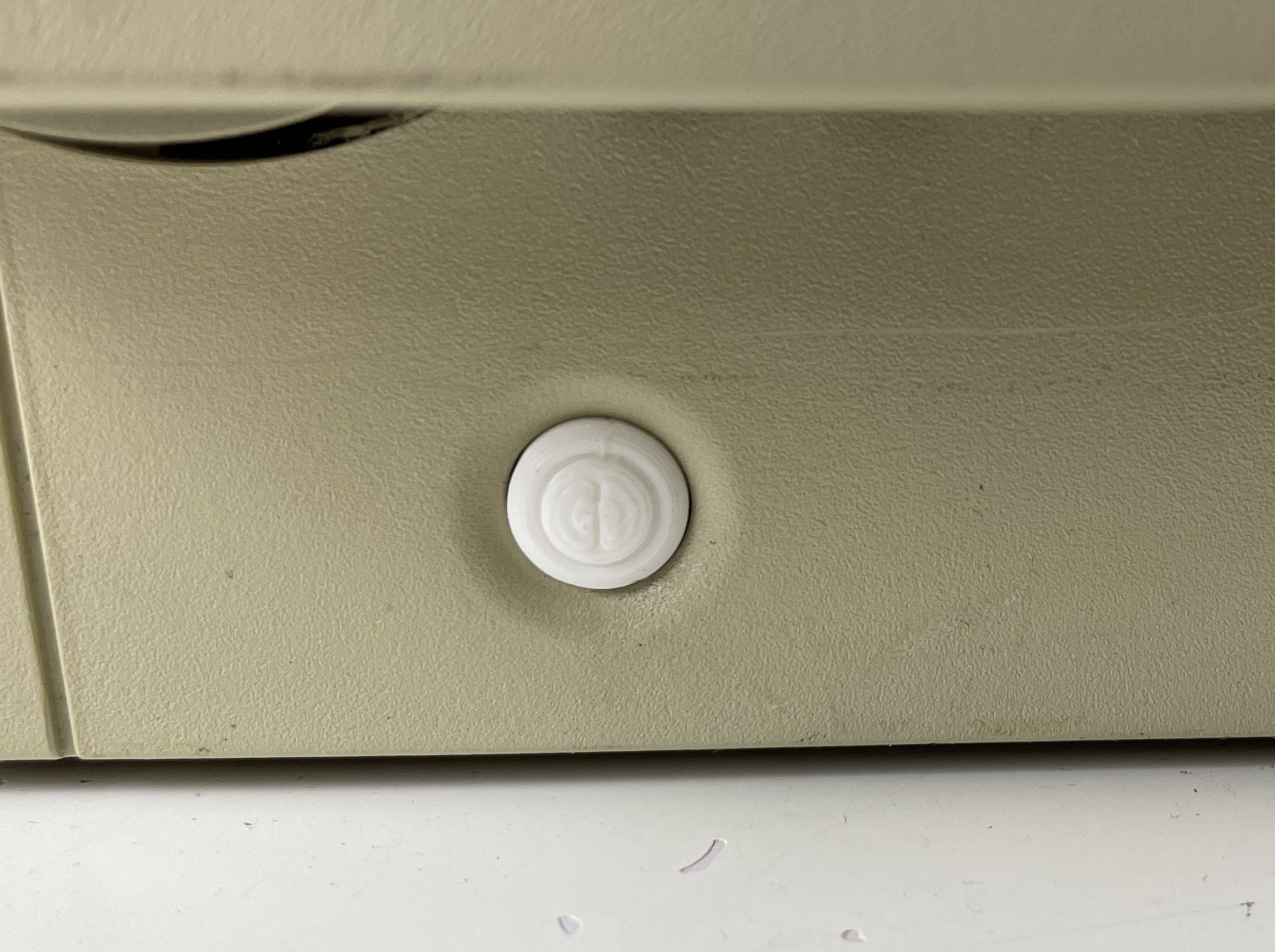
And yes, I know it's the wrong colour.

Kudos! The originals were nice until time's tide came along. They are incredible brittle now those buttons are. So yeah, good job!Here's the STEP and STL files to add the clips back to an original button. I'm tempted to make an extension of the original button to make it so it won't need to be pressed so much and get stuck sometimes like the original.
License under CC BY-NC-SA 4.0
View attachment 527
There's a lot of play in the position of the top case.Is it just me or does the button always tend to want to go to the left?

@Branchus can I ask what software you used to build this STL - I'm new to this and trying to figure out what the best tools are! I'm planning to build the motherboard standoff clips and the internal power switch clip (all of which are broken on mine) as an STL and share them here in case anyone else needs them!

First test printed. It seems pretty robust, so I'm pleased. I may make a few revisions though. I'll use the original button bit so that it looks original.
View attachment 519
I just did a 3D print from a STL file at https://www.printables.com/model/941283-apple-power-macintosh-7xxx-power-switch using a PRUSA printer and PETG material. I am not impressed. Perhaps I need to use a different filament material.
This switch look better.
That model looks like it's a 3D scan rather than something that's been parametrically modelled. It looks pretty rough to me.I just did a 3D print from a STL file at https://www.printables.com/model/941283-apple-power-macintosh-7xxx-power-switch using a PRUSA printer and PETG material. I am not impressed. Perhaps I need to use a different filament material.
This switch look better.
Did you dry your PETG filament? That looks like classic wet PETG print issues to me. It does look like the file is a 3d scan and not modeled (you can see the faint raised part number on the surface), but it is a really good 3d scan that looks very clean to me.
You definitely need to print with supports (because of the curves and overhangs), dry your PETG, and maybe start with a reference cube or 3D Benchy first before trying to print this part again.
You definitely need to print with supports (because of the curves and overhangs), dry your PETG, and maybe start with a reference cube or 3D Benchy first before trying to print this part again.
Yes, the PETG was dry.Did you dry your PETG filament? That looks like classic wet PETG print issues to me. It does look like the file is a 3d scan and not modeled (you can see the faint raised part number on the surface), but it is a really good 3d scan that looks very clean to me.
You definitely need to print with supports (because of the curves and overhangs), dry your PETG, and maybe start with a reference cube or 3D Benchy first before trying to print this part again.
We reoriented the model so the largest surface was the bottom layer. Lesss supported needed. We tried an in fill of 25% - 30% and that seems to be too much. The engineering students are pretty good with the 3D printer, so perhaps they can help me adjust things. Cleaning up the support fills is tough to do on that first bad print.
I did the PMac 7600 kick stand earlier and it turned out great.

Thanks. I will work with one of the engineering students and set up a nylon sliced version. Though I did use Co-Pilot to customize my PRUSA settings. Here is the sliced screenshot.After my own disastrous PETG print (too flexible), I printed one in Nylon, and it works well. It won’t shatter the way my polyurethane casting from 2012 recently did.

I just did a 3D print from a STL file at https://www.printables.com/model/941283-apple-power-macintosh-7xxx-power-switch using a PRUSA printer and PETG material. I am not impressed. Perhaps I need to use a different filament material.
This switch look better.
Just noticed that this is really a switch for Quadra 840AV, not 7x00. I was wondering why it looked weird.