Quadra 950 CD Audio Cable?

eric

Administrator
Staff member
Sep 2, 2021
1,328
2,307
113
MN
bluescsi.com
Hey all!

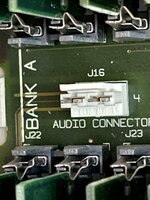
Have my Quadra 950 currently setup on the "using" desk and stuck a CD in to listen to.. but no audio! I see there is a header between the RAM slots for audio in, but as far as I can tell it doesn't look like the standard cd audio port. I took out the cable from my 6100 and that was not the same. Tried another one from a umax clone, that didn't fit. What kind of cable is it?
 
Hey all!

Have my Quadra 950 currently setup on the "using" desk and stuck a CD in to listen to.. but no audio! I see there is a header between the RAM slots for audio in, but as far as I can tell it doesn't look like the standard cd audio port. I took out the cable from my 6100 and that was not the same. Tried another one from a umax clone, that didn't fit. What kind of cable is it?
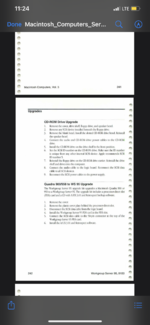
I’ll have to look in mine later, I looked in the apple service guides I have as well as the manual and found nothing that would give the part number for the CD carrier, I imagine that connector is for the tape drive (if not my apologies have to check later).
 

Attachments

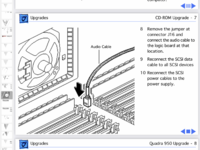
Wait a minute found some information, a standard cable should work but you have to select it to ID 5. Here’s a snippet of the apple service guide from 1994.
 

Attachments

  • 1B88BAF4-2467-4162-8F4F-ED0DDC4D73CC.png
    1B88BAF4-2467-4162-8F4F-ED0DDC4D73CC.png
    300.2 KB · Views: 329
  • Like
Reactions: KingDingus
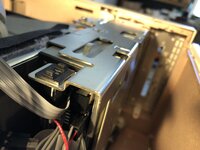
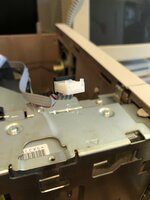
Mine is a 4 wires cable.
Audio is working fine with it, whatever the SCSI ID. The ID 5 in the apple service guide is just a suggestion,
with pictures
 

Attachments

  • BC64EFCF-55CC-4F53-A65B-C9BF66C7CA0E.jpeg
    BC64EFCF-55CC-4F53-A65B-C9BF66C7CA0E.jpeg
    939.1 KB · Views: 311
  • 96B95FD7-CE3D-4F76-B4B7-DB413340C34E.jpeg
    96B95FD7-CE3D-4F76-B4B7-DB413340C34E.jpeg
    1.1 MB · Views: 305
Last edited:
I'm not sure, it looks odd to me. And good to know there are so many types. Here's the best picture I could get
 

Attachments

  • E723E8B4-DBB9-46AD-B6EA-4E61A5F118CF.jpeg
    E723E8B4-DBB9-46AD-B6EA-4E61A5F118CF.jpeg
    899.9 KB · Views: 282
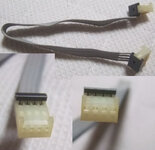
Both ends are the same and the cable is exactly the one on Buyee that jajan547 suggested.
This buyee cable is the same one as I took out of my 6100 - and it doesnt fit. If you look at the photo of my board it has a notch and two openings, both key'd.
 
Just to make sure, you did removed the 2 jumpers from the connector you showed right?
Well, who would have thought there would be jumpers on an audio connector? Then yes it's the same as my 6100's cable/buyee link.

Thanks for the help!
 

Attachments

  • i-img495x480-1655263938jkqcq1344455.jpg
    i-img495x480-1655263938jkqcq1344455.jpg
    29.1 KB · Views: 294
  • Like
Reactions: retr01 and jajan547
That makes sense. I didn't recognize those parts as jumpers.

They're probably a bodge to prevent oscillations or other interference without an input.
 
  • Like
Reactions: eric
Well, who would have thought there would be jumpers on an audio connector? Then yes it's the same as my 6100's cable/buyee link.

Thanks for the help!
Looks like this jumper was there from Apple. CD-ROM was actually an update. Attached copy of the Apple Service Source
 

Attachments

  • 65ED665E-B1F8-409D-9BBE-FCC7BDD2E821.png
    65ED665E-B1F8-409D-9BBE-FCC7BDD2E821.png
    308.7 KB · Views: 287
Yes the connector between the RAM slots is for CD audio input. With no cable, there should be two jumpers installed grounding the input to reduce noise.

Remove the jumpers and any 1x4 pin connector with 1mm spacing should fit it. It's the same metal pins and electrical layout as any other CD audio connector, with left and right audio on the outside and the center two pins being ground. Any CD audio cable should work, but they look funky in this older style Molex connector.
 
Back